Sbpay Register – Sbpay App Download Guide (India)

Sbpay is India's app and service guide. Download the Sbpay app for Android, register with mobile OTP, log in securely, and start buying or selling tokens via direct UPI. Zero deposit needed to get started.
Register Now Login Now Download Sbpay App Join Telegram ChannelFirst Published: 18 October 2026 | Last Updated: 18 October 2026
| Details | Information |
|---|---|
| App Name | Sbpay (Sbpay) |
| Platform Type | P2P Token Trading & Wallet App |
| Earning Model | Trading commissions & referral rewards (results vary, not guaranteed) |
| Referral Commission | Lifetime + Milestone Bonuses (per app terms) |
| Login Method | Mobile OTP / Secure Password |
| Website | sbpay-app.com |
| Payment Mode | Direct UPI (Payment mode (verify in app)) |
| Displayed Token Rate | 1 USDT = ₹112 (may change) |
| Supported Devices | Android 5.0 and above |
| Registration | Mobile Number + OTP (Free) |
| Regulatory Status | Not independently verified; check relevant official records |
Important Disclaimer
This website is an independent information page about Sbpay. It is not the service provider, bank, wallet or financial advisor, and it does not guarantee any earning, profit or return.
Sbpay is a digital service/app guide and is not registered with RBI / SEBI / FIU-IND. Token rates change, transactions carry payment risk and you may lose money. Verify everything independently and never invest money you cannot afford to lose. Read our full Disclaimer, User Safety and Privacy Policy.
Sbpay App Screenshots
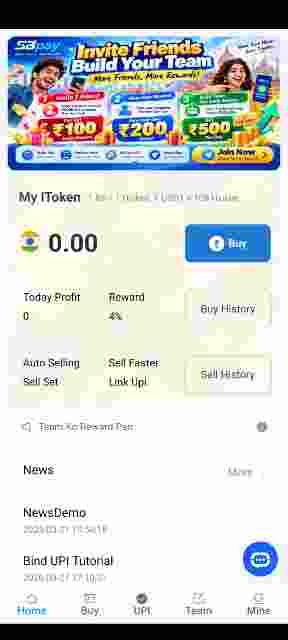
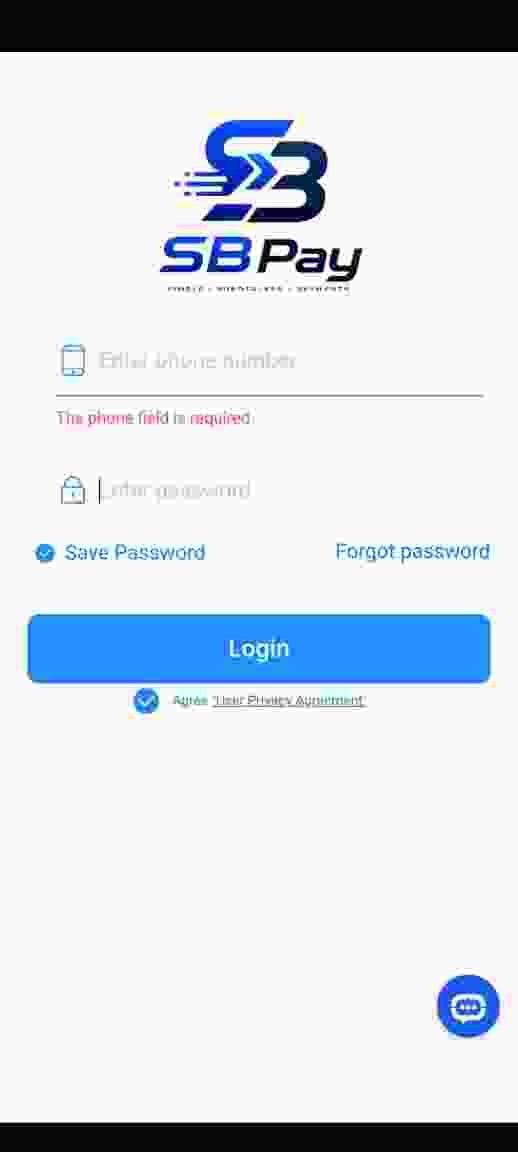
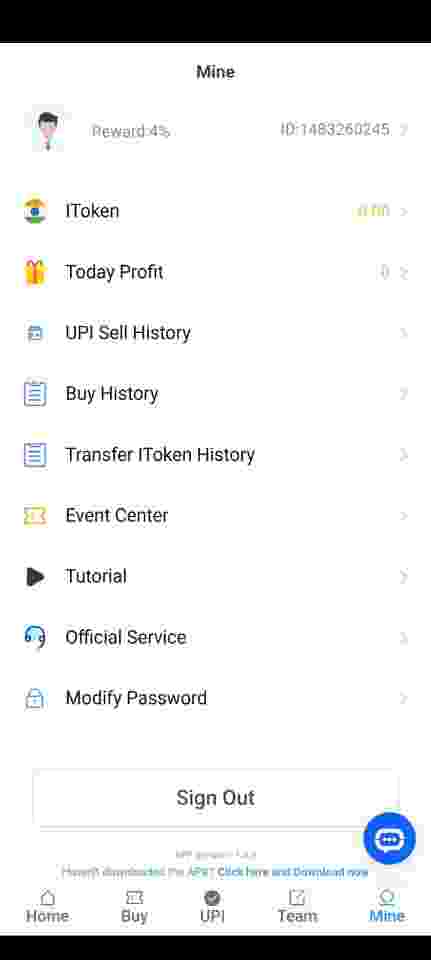
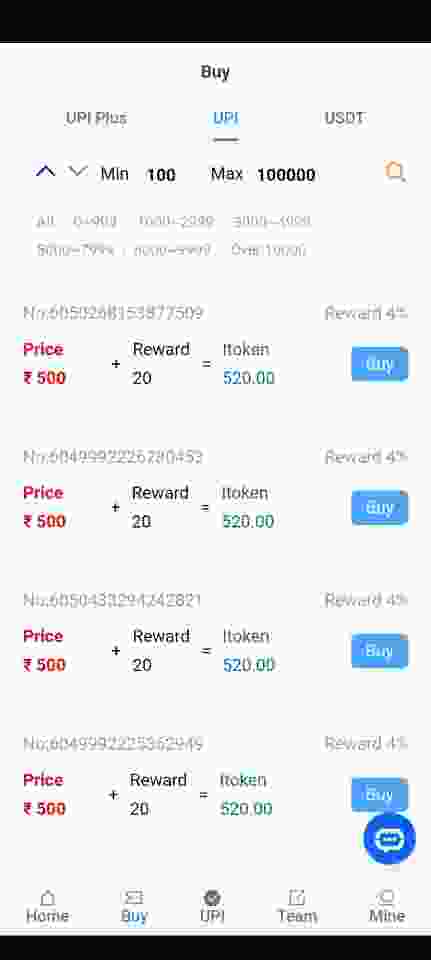
What is Sbpay?
Sbpay is a peer-to-peer (P2P) token trading and digital wallet app designed for Android users in India. The Sbpay app connects token buyers with token sellers on a single platform. All payments on Sbpay happen directly between users through UPI – the platform only matches orders and charges a small commission when a Sbpay trade completes successfully.
Getting started on Sbpay is simple and free. You download the Sbpay app from sbpay-app.com, register with your mobile number, set a secure password, verify with OTP, and you can begin trading Sbpay balance the same day with zero deposit.
Every Sbpay trade settles through direct UPI transfer between buyer and seller. The Sbpay referral program rewards you with lifetime commissions on purchases made by users you invite. Join the Sbpay support channel (verify independently) for platform updates, trading tips and community discussions. For more about this guide, visit the About Sbpay page.
Sbpay App Name
People search for Sbpay using many terms – Sbpay, Sbpay App, Sbpay Download, Sbpay App Download, Sbpay Login, Sbpay Register, Sbpay app and sbpay-app.com. All these terms refer to the same Sbpay platform and application.
Sbpay Search Terms
Table of Contents
- 1What is Sbpay?
- 2Why Do People Use Sbpay?
- 3What is P2P Trading?
- 4Sbpay App Download
- 5Sbpay Registration
- 6Sbpay Login Process
- 7How to Buy Tokens
- 8How to Sell Tokens
- 9Verify UPI Payment
- 10Withdraw Earnings
- 11Earning Model
- 12What is Sbpay balance?
- 13Referral Program
- 14Sbpay Refer Code
- 15Fees
- 16Pros & Cons
- 17Security & Safety
- 18Key Features
- 19FAQs
Why Do People Use Sbpay?
People choose Sbpay because the Sbpay app makes app/service use simple and accessible. No heavy KYC process, no upfront deposit, and no complex order books – Sbpay is built for everyday users in India.
- Zero investment to start: Begin trading Sbpay balance on Sbpay without depositing a single rupee
- Direct UPI payments: Money moves directly between Sbpay buyer and seller – the platform never holds your funds
- Sbpay referral program: Earn lifetime commission on purchases made by users you refer to Sbpay
- 24/7 Sbpay support: The Sbpay support team is available inside the app round the clock
- Sbpay Telegram community: Active group where Sbpay users discuss trades, share tips and get updates
- User-controlled funds: Sbpay acts as a matching layer – your money stays in your UPI account
What is P2P Trading on Sbpay?
If you are new to Sbpay and app/service use, here is how the Sbpay trading model works before you spend even one rupee.
- What is P2P on Sbpay? Peer-to-peer means you trade directly with another Sbpay user. The Sbpay app shows you the matching buyer or seller – the money moves directly between the two of you via UPI.
- What is Sbpay balance? Sbpay balance is the digital token you buy, hold, and sell inside the Sbpay app. Its value moves with demand, like any other tradable asset.
- How does a Sbpay trade work? A seller lists Sbpay balance at a price, a buyer accepts and pays the seller's UPI ID directly, the seller confirms receipt, and Sbpay balance is released to the buyer instantly.
- What is the risk? Sbpay balance prices can go up or down, and Sbpay trades depend on both sides being honest. Always verify UPI payments in your bank app before releasing tokens.
How to Download and Install the Sbpay App
Downloading the Sbpay app takes about two minutes on any Android phone. Follow these steps to get the Sbpay app:
- Check compatibility: The Sbpay app runs on Android 5.0 and above. Keep about 50MB of free storage.
- Open Sbpay website: Visit sbpay-app.com on your phone browser
- Download Sbpay app: Tap the Download button on this page to get the latest Sbpay app file
- Allow unknown sources: Enable "Install unknown apps" for your browser under Settings > Security
- Install Sbpay: Open the downloaded Sbpay app file and tap Install. Wait for it to finish.
- Verify the app: After installation, check that the app name and icon read "Sbpay"
- Register on Sbpay: Open the Sbpay app and complete Sbpay registration with your mobile number and OTP
iPhone users: The Sbpay app is currently available for Android only. Follow the Sbpay Telegram channel for iOS updates.
Sbpay Register – How to Create Your Account
Registration is free and takes less than two minutes. Follow these steps:
- Download and open the Sbpay app from the website
- Tap Register on the welcome screen
- Enter your +91 mobile number
- Create a strong password (use a mix of letters, numbers and symbols)
- If the service provides a referral field, use a code only after verifying it from a trusted source
- Verify with the OTP sent to your phone
- Complete the one-time profile setup and you are ready to trade
Sbpay Login – How to Log In
Logging back in is straightforward. Open the app, enter your registered mobile number, and verify with the OTP or password.
- Open the Sbpay app on your device
- Enter your registered mobile number (+91 India)
- Verify using OTP or enter your secure password
- Access your dashboard and start buying/selling tokens
Forgot Sbpay Password
- Open the Sbpay login page
- Select Forgot Password if the option is available
- Complete the verification process provided by the platform
- Set a new password and use it for your next login
Common Login Problems
When Sbpay login does not work, check your internet connection, confirm that your account details are entered correctly and make sure you are using the current version of the application.
How to Buy Tokens on Sbpay
- Log in and open the Buy section from the main menu
- Browse the seller list and pick a price that suits you
- Enter the token quantity and total amount you wish to purchase
- Pay the seller directly on their UPI ID
- Tap the "I Have Paid" button to notify the seller
- The seller confirms receipt and tokens are credited to your wallet instantly
How to Sell Tokens on Sbpay
- Open the Sell section in the Sbpay app
- Add or confirm your own UPI ID where you want to receive the money
- Set your token quantity and desired selling price
- Wait for a buyer to pick your offer
- The buyer sends payment to your UPI ID
- Check your bank/UPI app and confirm the money has arrived
- Tap Confirm Payment to release the tokens to the buyer
How to Verify a UPI Payment Before Releasing Tokens
This single habit protects you from most P2P fraud. Before you release tokens to any buyer:
- Open your own UPI/bank app – never trust a screenshot sent by the buyer
- Check the exact amount matches the order total, including any decimals
- Check the sender name and UPI ID match the buyer's profile in the app
- Confirm the transaction shows "Success" in your statement, not "Pending"
- Only then tap Confirm Payment inside the Sbpay app
How to Withdraw Earnings from Sbpay
- Open the Withdraw section from the app menu
- Enter the amount you want to withdraw
- Select your UPI-linked bank account
- Review the details and confirm the request
- Track the status from the Withdrawal History page
- Money lands directly in your bank account once processed
How the Sbpay Earning Model Works
- Sbpay Trading: Buy Sbpay balance at a price you accept and sell when the Sbpay balance price moves in your favour. A commission applies per completed Sbpay trade, as per app terms.
- Sbpay Referrals: The Sbpay app offers a lifetime commission on purchases made by users you refer to Sbpay, plus milestone bonuses.
- Volume-based rewards: Active Sbpay traders may unlock volume-based commissions on monthly Sbpay balance trading, as per app terms.
A word of caution: none of this is guaranteed income. What you earn on Sbpay depends on your trading activity, Sbpay balance market movement and how your Sbpay referral network grows.
What is Sbpay balance?
Sbpay balance is the native token or balance unit inside the Sbpay app. Sbpay users buy Sbpay balance from other users and sell Sbpay balance to other users through the Sbpay transactions system.
The Sbpay app displays a live Sbpay balance rate (for example, 1 USDT = ₹112), which may change at any time based on market demand. Always check the current Sbpay balance rate inside the Sbpay app just before placing any trade.
Key Points About Sbpay balance
- Sbpay balance is traded inside the Sbpay wallet and transactions section.
- The Sbpay balance rate shown in the Sbpay app may change without notice.
- Payment for Sbpay balance trades is made directly between Sbpay users through UPI.
- Sbpay balance is not a currency issued or approved by RBI.
Sbpay Referral Program – How It Works
The Sbpay referral program lets you earn from your network without trading more Sbpay balance. Share your Sbpay referral code with friends, and every Sbpay balance purchase they make gives you a lifetime commission on Sbpay.
| Referral Level | Who Is Counted | Commission |
|---|---|---|
| Level 1 | Users who register directly with your Refer Code | As per app terms |
| Level 2 | Users referred by your Level 1 members | As per app terms |
| Level 3 | Users referred by your Level 2 members | As per app terms |
How Referral Commission Works
- Copy your Refer Code from the app
- Share it with a person who wants to join
- The person enters your code in the referral field while registering
- Commission, if any, is credited as per the platform rules when the referred user completes eligible trades
Sbpay Refer Code
Users searching for Sbpay Refer Code or Sbpay Invite Code should enter a referral code only when the registration page provides a suitable referral field.
How to Use Sbpay Refer Code
- Open the Sbpay registration page
- Enter the requested account details
- Add the Sbpay Refer Code or Invite Code Check inside app in the referral field
- Complete the required verification process
- Check the entered information and submit your registration
Sbpay Fees – What Does Trading Cost You?
- Registration: Free – no charge to create an account
- Deposits: Not applicable – Sbpay does not require any deposit
- Trade commission: Deducted automatically when a trade completes (as per app terms)
- Withdrawals: No platform fee – the amount you request is the amount you receive
- Referral payouts: Paid directly to your wallet balance with no processing fee
Pros and Cons of Sbpay
| Pros | Cons |
|---|---|
| Zero investment required to start trading Sbpay balance | Sbpay is not registered with RBI or SEBI |
| Sbpay service model – platform never holds user funds | Sbpay app distribution only (not listed on Play Store) |
| UPI payments move directly between Sbpay buyers and sellers | Phishing risk from fake Sbpay websites – use only sbpay-app.com |
| Active Sbpay Telegram community for discussion | Sbpay users must verify payments manually before confirming |
| Built-in Sbpay appeal system for disputed transactions | No public Sbpay customer care number (anti-scam measure) |
| Simple Sbpay onboarding with no upfront deposit | Sbpay is not a guaranteed income source – results vary |
Points to Consider Before You Trade on Sbpay
- Download source: Use only sbpay-app.com for the app download.
- Regulatory status: Sbpay is not registered with RBI or SEBI.
- Payment flow: service model – payments happen directly between users via UPI.
- Support channel: Support is available only inside the app; there is no public phone number.
- Risk level: Token prices fluctuate, and earnings are never guaranteed.
Final note: Trade only with money you can afford to lose, and start with small amounts until you understand how the platform works.
Regulatory Status – What You Should Know
- Not regulated: Sbpay and its tokens are not registered with RBI or SEBI
- No deposits or gambling: The model is based on direct user-to-user trades via UPI
- UPI payments: Processed by banks under standard UPI rules
- Your responsibility: Consider consulting a professional before trading if you have questions
- Educational content: This page is not legal or financial advice
See our full Disclaimer for details.
Sbpay Security – Safety Tips for Every User
- Verify every payment: Never release tokens until you have personally confirmed the UPI payment in your bank app.
- Never share OTP or password: Sbpay support will never ask for these. Anyone who asks is a fraudster.
- Use a strong password: Create a unique password and change it every few months.
- Download only from sbpay-app.com: Fake apps with similar names exist.
- Use the in-app appeal system: If a trade goes wrong, raise a dispute through the app immediately.
- Keep the app updated: Always install the latest version from the website.
Warning Signs of a Scam
- Someone requests your OTP or verification code
- Someone asks for your UPI PIN or banking password
- An unknown person sends you an app file
- A suspicious website uses Sbpay branding without verification
- Someone promises guaranteed earnings or returns
Common Scams Around Sbpay & How to Avoid Them
- Fake customer care numbers: Sbpay has NO public phone number – support is only inside the app.
- Fake download websites: Clone sites with similar names try to install malware. Only sbpay-app.com is linked from this guide.
- Fake Telegram admins: Scammers create groups with the Sbpay name and ask for deposits.
- Advance-fee fraud: Anyone asking you to pay to "unlock withdrawals" or "activate your account" is lying.
- Buyer/seller payment tricks: Always check your own UPI app before confirming.
Risks & Responsible Trading
- Price fluctuation: Tokens can go up or down. Only trade with amounts you can afford to lose.
- Unregulated activity: Sbpay is not registered with RBI or SEBI.
- No guaranteed income: Earnings depend entirely on your trading activity and referral network.
- Impersonation scams: Fake websites and Telegram groups misuse the Sbpay name.
- Manual verification: In P2P, you confirm payments yourself. A missed step can lead to disputes.
Key Features of the Sbpay App
- Zero investment: Start trading Sbpay balance on Sbpay without any upfront deposit
- Sbpay service model: Direct buy/sell Sbpay balance between Sbpay users via UPI payments
- Sbpay referral system: Lifetime commission plus milestone bonuses for referring new Sbpay users
- Sbpay withdrawal: UPI and bank transfers, typically processed within 24 to 48 hours
- 24/7 Sbpay support: Live chat inside the Sbpay app for dispute resolution and trading help
- Lightweight Sbpay app: Works on Android 5.0 and above devices
- Sbpay appeal system: Raise disputes inside the Sbpay app when a trade goes wrong
- Mobile-friendly Sbpay application interface
- Sbpay account registration with mobile number and OTP
- Sbpay wallet to view and manage your Sbpay balance balance
- Live Sbpay balance rate displayed inside the Sbpay app (may change)
- Sbpay order history and transaction records
- Official Sbpay updates through the Telegram channel
Common Issues and Fixes
- OTP not coming: Check your network signal, disable any VPN, restart your phone, and try again
- Login failed: Clear the app cache, reset your password, or reinstall the app
- App crashing: Reinstall the latest Sbpay version from the website
- Slow loading: Free up storage space on your device
- Payment pending: Message the other party directly or raise an in-app appeal
- Withdrawal delayed: Check your bank details, then raise an in-app appeal if it crosses 48 hours
How to Contact Sbpay Customer Support
Need help? Use the in-app live chat – that is the only support channel and it runs 24/7. Sbpay deliberately has no public phone number; it is an anti-scam measure. Any "customer care number" you see online is fake.
For website-related queries, you can also use our Contact Us page.
Contact Sbpay SupportSbpay – What Users Commonly Report
- UPI settlements: Many users say trades and withdrawals complete within a day or two
- Simple onboarding: Beginners regularly mention how easy registration and the first trade are
- Referral earnings: Some referrers report that lifetime commissions arrive on time
- Support response: Users appreciate the in-app appeal system for resolving disputes
Frequently Asked Questions
01 What is Sbpay?
Sbpay is a name users may search for in relation to an app or online service. Verify its identity and features through trusted sources.
02 How can I download Sbpay App?
Check the provider’s verified source for any app download. Avoid installing app files from unknown sources.
03 How do I register on Sbpay?
Download the app from sbpay-app.com, tap Register, enter your mobile number, create a password, follow the current registration instructions shown by the service provider.
04 How do I login to Sbpay?
Open the app, enter your registered mobile number and verify using OTP or password.
05 Is Sbpay free to use?
Registration is free. Trading commissions apply per completed trade as per app terms.
06 Should I share my Sbpay OTP?
No. Never disclose your OTP or verification code to another person, even if they claim to represent customer support.
07 What should I do if Sbpay Login is not working?
Check your internet connection, confirm your login details, update the application if required and use the available official support option.